Search your email from anywhere with ⌘K
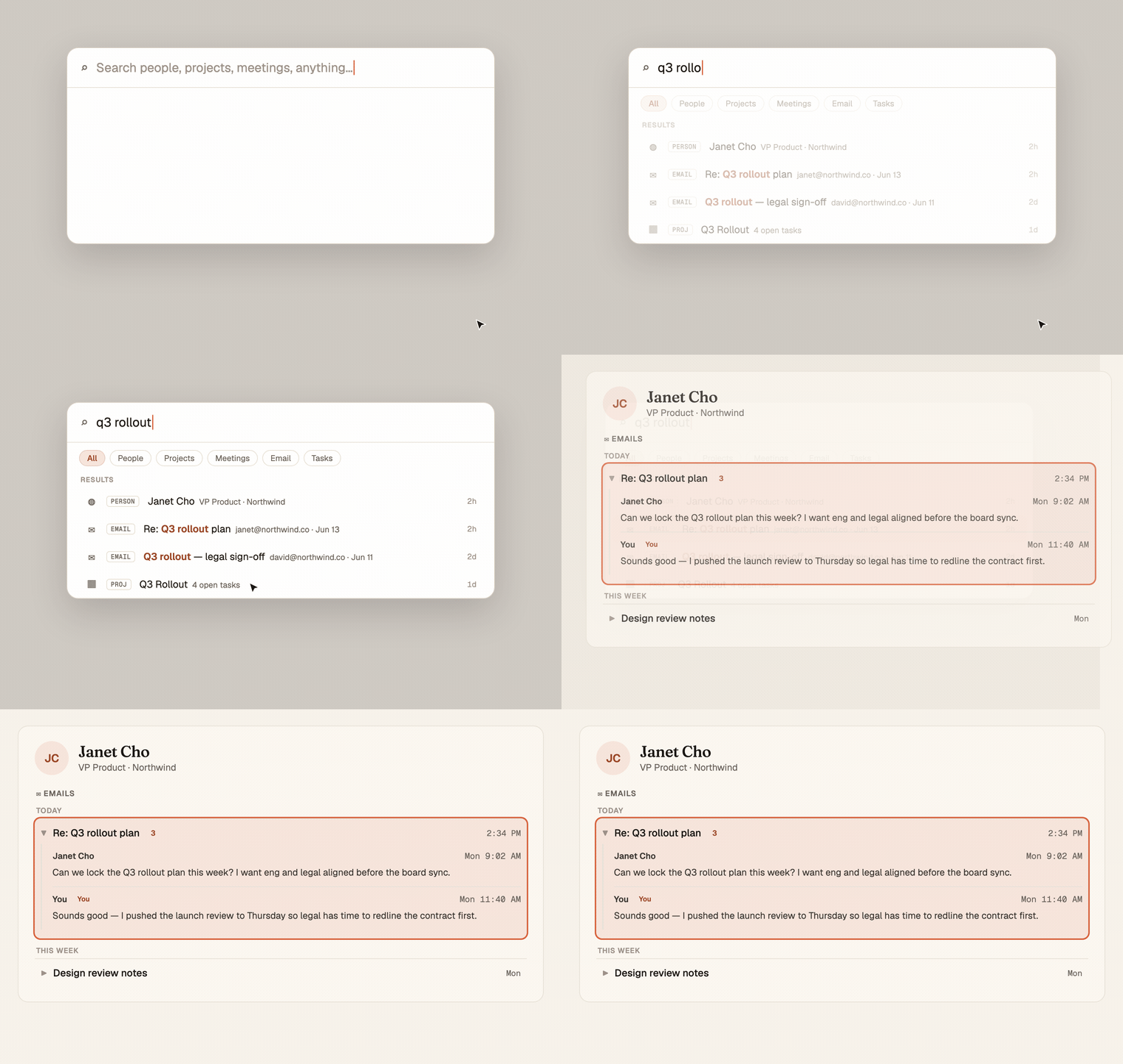
Spotlight now searches inside your email, not just names and titles. Type a phrase you remember, find the thread it lived in, and click straight through to that conversation on the person's page. The thing you half-remember is two keystrokes away.
Mitch Kessler
Founder
You remember the sentence but not the sender. "Someone said legal needed until Thursday." Was that an email? A meeting? Who said it? So you open your inbox, guess at search terms, and scroll, because the words you actually remember are buried in a body you can't search by name.
Spotlight reads your email now.
What changed
Hit ⌘K and type. Spotlight has always found people, projects, meetings, and tasks. Now it searches inside your email too, the subject, the body, the sender, all of it. The half-sentence you remember is enough to surface the thread it came from.
- Email hits show up inline, right alongside people and projects, each tagged so you know what you're looking at. Subject line, who sent it, when.
- The words you typed are highlighted in the result, so you can see at a glance which thread is the one.
- Filter to just email with the Email chip if that's all you want, or leave it on All and let the best match win.
Click through to the conversation
This is the part that saves you the dig. Click an email result and Chief doesn't dump you in a raw inbox. It opens that person's page, expands their Emails section, and scrolls straight to the exact thread, already open to the conversation. You land on the words you searched for, in the context of the relationship they belong to.
Recents that actually mean recent
Open Spotlight with an empty box and you see who you've actually been dealing with. Recents now rank by real activity, so the person you emailed an hour ago is right there at the top. Contacts that got pulled in from an integration but you've never touched no longer crowd the list pretending to be recent.
Where you see it
Press ⌘K anywhere in Chief. Type a few words from something you remember. The email it lived in is right there, one click from the full conversation.